Getting your PC ready for Machine Learning
Hellooo... and welcome back :)
So far we saw what is Machine Learning and understood how some basic ML algorithms works, what we can accomplish using these ML Algorithms. However, in order to perform these tasks we need a system to create, train, evaluate and deploy these algorithms.
As we saw earlier, the machine learning process is nothing but an algorithm that goes through each and every entry of input data and assume some weights to the features (discussed in previous article). The process of machine learning doesn't end here. We have to evaluate the model so that it can provide most accurate results. This training and evaluation process takes place over many iterations until a required accuracy threshold is reached.
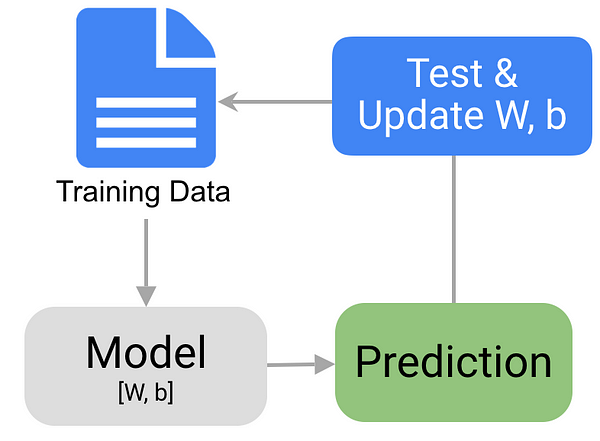
During the evaluation process, if the algorithm's results are poor and not up-to the mark, the algorithm goes back to the data, revisits every entry and re-adjust the weights that it initially assumed. This is repetitive and most time consuming process. Because of this, it is recommended to have at least multi core processor and a decent amount of RAM (memory) and large capacity storage to store huge data sets.
However, we don't have to worry, since most of the recent PCs and laptops are capable for the machine learning task. When you buy a new PC or Laptop (or) if you already have one, make sure it meets the below requirements for an optimal user experience.
Processor – Intel / AMD CPU with 2 or more processing cores
RAM – Minimum 4 GB (as windows already consumes 1-2 GB) or above
Hard Disk - Minimum 500 GB
GPU – optional for basic ML models, but still, a good Graphics card with large VRAM(graphics memory) is highly recommended if we need to create models with neural networks.
In spite of above, keep in mind that there is thumb rule minimum configuration requirement to do ML tasks. It can run on any low-end hardware like Rasberry pi to high end Enterprise level server hardware. Other than this there is another way to create and run your ML algorithms, through "Cloud" services like Google's Co-lab, Amazon's AWS, etc. but that is the topic for another day.
Now let us move to software requirements...
Since most of the ML algorithms are platform independent we can literally use any programming language like Java, C, C++, Python, etc. to create models. However, for the learning purpose I find "Python" as most versatile and easy to learn programming language. Also, there are numerous resources available online for learning and practicing and even there are countless online communities, where we can get help if we stumble at any point.
Python is a general purpose programming language.So, we need many additional libraries that helps us to accomplish different types of specialized task. To put it in a simple way, Python is like a pizza base. We can add different ingredients and toppings on the pizza base and bake it to make varieties of flavors. Likewise, in python we can add various Packages or libraries to do different tasks.

For the purpose of Machine Learning there are many special libraries and packages like Numpy, Pandas, scikit learn, Tensorflow, Keras etc. we will look one by one as we proceed. To simplify installing all these packages, there is a specialized package manager for the Machine Learning , which is called "Anaconda". This Anaconda package manager contains all necessary packages and libraries required for creating ML models.
There are tons of resources online on how to download, install and setup your PC for ML purpose. I will include the resources and Video links below, which you can follow step by step and get your PC ready for Machine Learning.
Step 1: Python Installation and setup
Step 2: Anaconda Environment setup (another link)
Step 3: Open Jupyter notebook and start coding
Voila.... here you start your journey too., into machine learning.
All the best. :)

Comments
Post a Comment